Section-based targeting
Measures the loudest sliding window (default 20 s / 5 s hop), not whole-file average or playback-time trim.
Open source · Windows build · macOS from source
DropGain finds the loudest section of your track, lets you set your own LUFS target and true-peak ceiling, and renders _DG copies without touching your originals. You'll always know how loud the drop actually hits.
Packaged Windows build available. Still in active development — try on a library copy first.
SECTION
Exports standard audio files for DJ libraries
Features
The only automated loudness tool in the world that isn't stuck on presets.
Set your own analysis window, LUFS band, ceiling, gain mode, and output routing. No fixed S/M/I windows, and sub-bass energy is read alongside LUFS.
LUFS / true-peak checked against Youlean Loudness Meter 2 and iZotope Insight 2.
Measures the loudest sliding window (default 20 s / 5 s hop), not whole-file average or playback-time trim.
Default -1.0 dBTP. When level and peak conflict, gain is reduced or limiter-assisted processing applies.
Linear gain when the ceiling allows. FabFilter Pro-L 2 or LoudMax with a capped max reduction when peak control is needed.
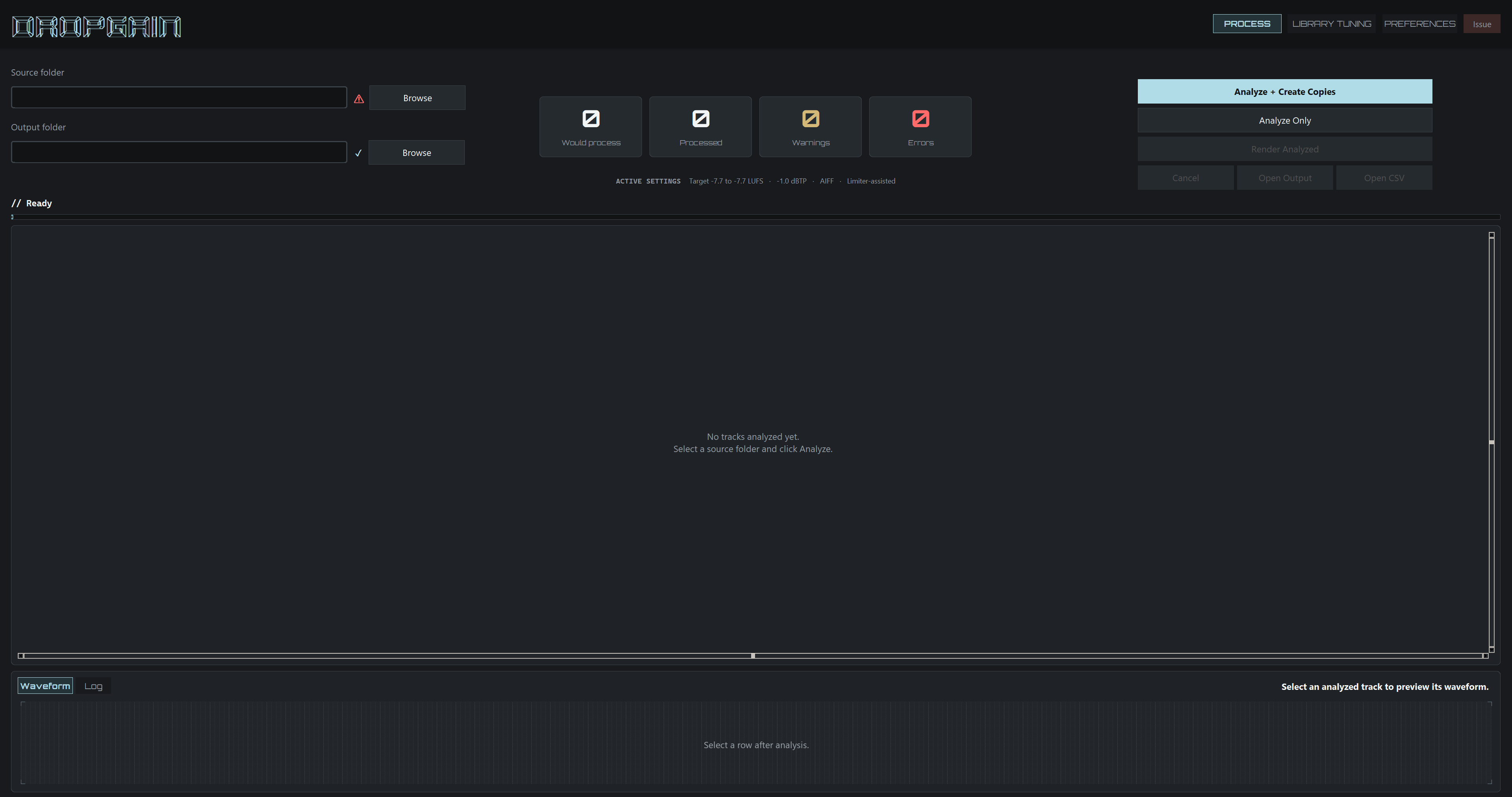
Recursive scan with programme and section LUFS, dBTP, sample peak, suggested gain, projections, and processing action per row.
Non-destructive copies beside sources or under a separate root. Preserve format, force AIFF/MP3, or decode MP3 to AIFF. Loudness-normalization tags are stripped; other metadata is kept.
Profile your library and get recommended targets, window/hop, thresholds, and ceiling settings.
Post-render re-measurement, loudness tags stripped, optional CSV report and session log.
On bass-heavy sections, low-band energy can reduce a boost or deepen a cut slightly. Configurable in Preferences.
Open by design
Closed prep tools trade transparency for convenience. DropGain is built the other way around.
Licensed under AGPL-3.0. Gain, limiting, and measurement logic live in the repo — auditable and forkable, not a black box.
Window length, hop size, LUFS targets, true-peak ceiling, gain mode, and export routing stay in your hands.
Every track is analyzed first. LUFS, dBTP, and suggested gain appear in the table before any batch processing runs.
Workflow
_DG in five stepsAnalyze your library, review per-track numbers, then render copies. Library Tuning is optional profiling along the way.
Current limitations
DropGain is a work in progress. A packaged Windows build is available; macOS and Linux may work from source but are untested. Validate results on a library copy before trusting a full batch.
Bugs are still possible. Behavior, defaults, and edge cases will change. Always try on a copy of your library first.
Tested on Windows by the author. Analysis and render load each file fully into memory; tracks longer than about 10 minutes may hang, use high RAM, or crash.
Limiter-assisted processing requires either FabFilter Pro-L 2 (VST3) or LoudMax (free). Analysis and clean-gain render work without a limiter plugin.
The app is functional but not polished. Expect rough edges while the interface improves.
Questions & answers
Clean gain mode applies linear level change when the ceiling allows. Limiter-assisted mode (optional) only applies capped reduction when peak control is needed. You set the targets; DropGain does not master your library in one click.
DJ auto-gain is a playback-time trim from library analysis. It does not rewrite audio. DropGain bakes section-based levels into _DG files you can load outside that app's database. Disable playback auto-gain when loading _DG exports in Rekordbox, Serato, TRAKTOR, VirtualDJ, and similar software. Engine DJ standalone players generally have no auto-gain on playback.
Not always. Once your library is prepped to a tight section target, many sets can run with channel trim near unity and you mostly mix on the faders. You still reach for trim when the room, an outlier track, or a transition needs a nudge. DropGain removes the big library mismatches; it does not remove live judgment.
DropGain reads and writes WAV, AIFF, MP3, and FLAC. The output format can match the source or be forced to AIFF or MP3 in Preferences.
Only for limiter-assisted mode. Clean gain, full library analysis, and the review table work without it. You can use either LoudMax (free) or Pro-L 2 (has 30-day free trial). On the packaged Windows build, drop LoudMax into plugins/ next to the exe, or use a system VST3 folder.
Analysis and rendering currently load each file fully into memory. Tracks longer than about 10 minutes may cause high RAM use, long hangs, or crashes, especially with multiple analysis workers or batch render plus verification. Split long material first, or lower Analysis workers in Preferences.
LUFS and true-peak readouts were cross-checked against Youlean Loudness Meter 2 and iZotope Insight 2. Neither is required to run DropGain.
Once a track already touches the true-peak ceiling, straight gain cannot push its loudness any further without clipping, no matter how it was mastered. Limiter-assisted mode (FabFilter Pro-L 2 or LoudMax, selectable in Preferences) only steps in on those peaks, and only when a track needs it: a hot EDM master that already sits at your target rarely gets touched, it is the quieter masters in the library that need a limiter to catch up without clipping. Limiter-assisted is the default for that reason, but clean gain stays one click away whenever you would rather not touch peaks at all, and a dedicated peak-repair mode is planned for a future update.
Reduction is capped rather than driven as hard as the limiter allows, so it closes the gap to your ceiling instead of flattening everything above it. How much room that leaves is up to you: the target band, ceiling, and gain mode are all set in Preferences, and Library Tuning can recommend values instead of relying on the defaults. If a track still feels over-limited, lower the target band or limiter budget.
Default target band is -7.8 to -7.5 LUFS (loudest section), with Limiter-assisted as the default normalization mode. That matches how current EDM masters are typically already mastered, so your prep holds up next to material from other DJs when you play B2B or in a set, instead of sitting quieter. Lower the target band, switch to Clean gain, or tune everything via Library Tuning if your library or venue needs something quieter.
LUFS measures perceived loudness using weighting that underweights the very lowest sub-bass. On a club or festival system, that low end can still hit hard in the room, so two tracks at the same LUFS target can land differently. Bass trim pulls gain back on bass-heavy outliers so loudness matching does not stack extra low end on top. It is optional and configurable in Preferences.
DropGain is free under AGPL-3.0: no paid tier, account, or subscription. I am lazy. Shipping and supporting a commercial product would mean a much more complicated code stack than the Python DropGain is built on now, and that is more work than I want to take on. That said, open source is also the point: you can read and change how gain, ceilings, bass trim, and limiting are decided, and fork or patch behavior instead of trusting a black-box batch processor. Free and open source is not a claim that DropGain sounds better than commercial tools, it is a claim that the workflow is inspectable and yours to adapt. It also reaches the widest possible audience and helps me get recognition as a bedroom DJ, since I have no professional background in developing apps or working with audio, this is a hobby project I am learning from as I go.
Limited time and solo development. DropGain started as a personal prep tool for my own library, and I still build for my own workflow first. It runs on Python and CustomTkinter, a stack I chose because it is simple to ship and maintain, not because it produces a slick desktop UI. I prioritize features and audio behavior over polish. Everyone else is welcome to use it, but visual design comes after the parts I rely on myself are solid.
Cannot find the answer? Start a discussion or email me.
Early adopters
No rented quotes or suspicious five-star screenshots — just an empty row until real DJs actually use DropGain in their prep workflow.
If that is you, drop me an email or start a discussion with a short note or before/after result. Good feedback may earn a name here later.
Setup
Prefer the packaged build on Windows. FFmpeg ships with the exe; limiter-assisted mode still needs a VST3. From-source install works the same once dependencies are on PATH or in bin/.
Disable playback auto gain before loading _DG exports
Required in Rekordbox, Serato, TRAKTOR, VirtualDJ, and similar software. Auto gain will fight the levels DropGain baked in. Engine DJ standalone players generally have no playback auto gain, so pre-leveled _DG files are usually fine there.
Grab the Windows build or run from source, set your targets, review the analysis table, and render_DG copies when you are ready.